
Summary
In recent weeks, a targeted brute-force campaign, has been attempting to compromise a wide range of Microsoft accounts. This entry dives into my personal experience with this attack and illustrates how accounts with two-factor authentication (2FA) enabled may still be at risk.
Saturday Night Surprise
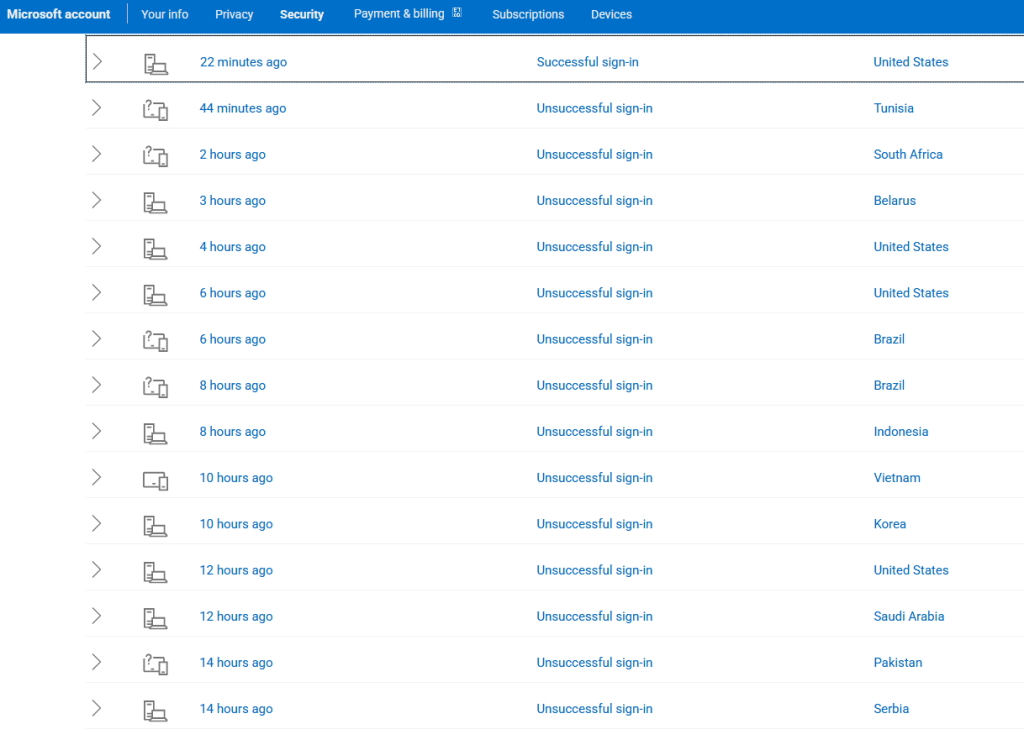
On Saturday, March 5th, 2025, a family member notified me that they had unexpectedly received a Microsoft 2FA One-Time-Passcode (OTP) by email. After some discussion, they took the proactive measure of looking at their login activity (Microsoft Sign-in > My Microsoft account > Security > View my sign-in activity). They discovered that someone—or something—had been unsuccessfully trying to gain access their account for over a month. And it wasn’t occasional. It was persistent and frequent.
Deja Vu All Over Again
Daily brute-force login attempts have become routine in this industry. Additionally, the start of this Microsoft brute-force campaign has dovetailed with other brute-force campaigns documented by XLab and security researcher Juan Pablo Castro.
A report from GreyNoise last Monday had a good portion of the industry checking for signs of a new zero-day exploit in their Palo Alto firewalls. On a hunch, I cross-referenced the IPs from the GreyNoise report with a list of malicious IPs from several brute force attempts directed at my place of employment. Sure enough, there were several matches. Given the overlap and considering the current state of affairs, I couldn’t shake the feeling that the Microsoft login attempts might be the result of a larger campaign.
Emerging Hypotheses
I have an OLD Hotmail account that I still use for things like making online purchases and it’s been victimized by a laundry list of data breaches. It’s full of spam and phishing emails, but it makes for an amazing opportunity to find all kinds of malicious things. This time, however, I wanted to see if this account was experiencing the same phenomenon as the family member’s Microsoft O365 account. The answer was a resounding yes. From March 7th, 2025, to April 6th, 2025, my Hotmail account saw more than 740 login attempts, each originating from different IPs located around the globe.
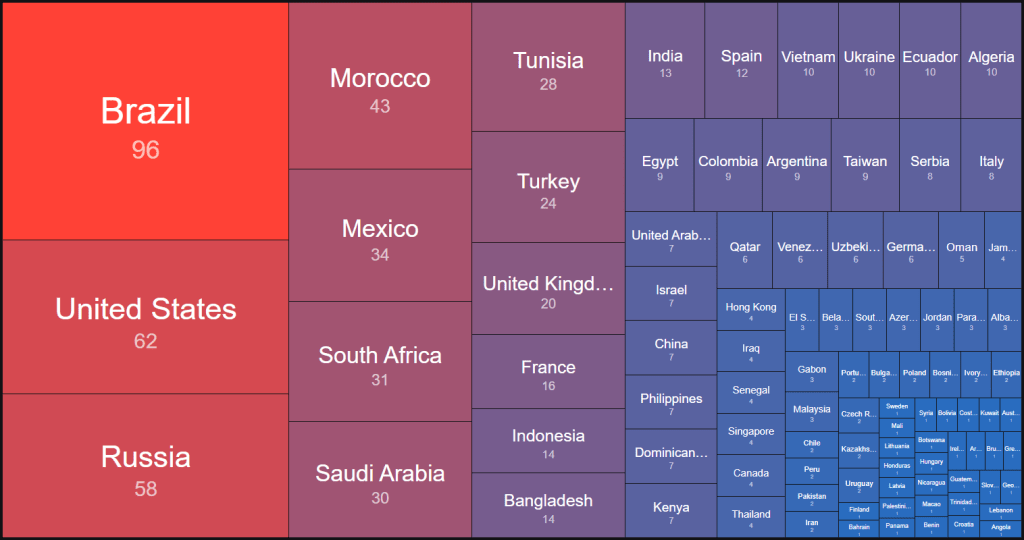
It’s important to point out at this juncture that the family member’s Microsoft O365 account is registered with a Gmail address. And, as I stated earlier, the other is a Hotmail account. This means that the attacker should have knowledge of the difference and is attacking both differently. This could be explained by the attacker having access to breach data, so I decided to test this theory.
I notified several colleagues and friends of the ongoing attack against my various accounts and asked if they were experiencing the same, and indeed they all were. However, the IPs responsible for the attacks on their account had zero crossover of with the IPs attacking my Hotmail account. Next, I logged into Microsoft.com with my O365 account (also a Gmail address) and discovered the same phenomenon, albeit with a bit less frequency. This time, there were only 102 login attempts between the same dates. However, there’s one caveat: according to Haveibeenpwned, this Gmail address is completely clean. That means it hasn’t appeared in any known breach, so the attacker shouldn’t have any reason to associate it with my Microsoft account.
Microsoft OTP Vulnerabilities
You might be asking, “Isn’t my account safe since 2FA is enabled?” The answer is a hard “NO.” In December of 2024, researchers at Oasis published a report documenting the Microsoft 2FA bypass vulnerability called AuthQuake. As I understand it, the AuthQuake attack relies on the attacker already having the victim’s username and password. After a successful login attempt, the user is prompted to enter a one-time passcode (OTP) sent to their email. The threat actor then has a window where they can brute-force the OTP without an account lockout or the user being notified.
Summary
If you’re looking for a takeaway here: if you see something strange, act fast, exercise extreme caution, and maintain a healthy dose paranoia. It’s a better look than explaining to your entire contact list why they have a cryptominer chewing up their GPU, and that’s best-case scenario.
Recommendations:
- Use long, complex passwords.
Make sure all of your Microsoft accounts use strong, unique passwords that are at least 16 characters long. Include uppercase and lowercase letters, numbers, and special characters. Avoid common patterns or anything that resembles a real word or phrase. Consider using a reputable password manager to generate and store them securely. - Enable two-factor authentication (2FA).
Ensure that 2FA is turned on for all Microsoft accounts. Ideally, use an app-based method like Microsoft Authenticator, Authy, or another TOTP-compliant app. Avoid SMS-based 2FA if possible, as it’s more vulnerable to SIM-swapping and interception. - If you receive an unexpected OTP (One-Time Passcode) by email, take immediate action:
This is often a sign someone has your password and is attempting to log in. - Change your password immediately.
Don’t wait or assume it’s a glitch. Reset it to a new, strong password you haven’t used before.- Check for unfamiliar sign-ins or devices.
Go to your Microsoft account > Security > View my sign-in activity. Look for IPs or devices that you don’t recognize.
- Sign out of all active sessions.
Even if you don’t see anything suspicious, it’s a good idea to remove all signed-in devices and start fresh. This ensures that if someone did gain access, they’ll be kicked out.
- Review email forwarding rules and account permissions.
Threat actors who gain access often create stealthy inbox rules that forward your emails elsewhere or hide security alerts. Go to your Outlook or Gmail settings and look for any rules or connected apps you didn’t create.
- Secure your recovery options.
Your backup email and phone number should also be protected with strong passwords and 2FA. If an attacker gains access to your recovery methods, they can bypass your security entirely.
- Audit connected apps and services.
In your Microsoft account settings, review third-party apps or services with access. Revoke anything you don’t recognize or no longer use.
- Set up alerts for new sign-ins.
Microsoft offers alerts for new logins or security events. Make sure those are enabled, and check your spam folder occasionally—they sometimes end up there.
- Check for unfamiliar sign-ins or devices.
- Educate family and friends.
The best personal security sometimes starts with others. If your email is tied to someone else’s account or recovery options, help them lock down their end too.
IOCs
https://github.com/d33p-div3r/iocs/blob/main/2025/microsoft-bruteforce/brute-force-ips
 DEEP DIVER - Cybersecurity Blog